Travel Changes the Clock Before It Changes Your Routine
A flight lands, your phone updates itself, and suddenly the schedule you followed yesterday no longer matches the sky outside. For Muslims who want to keep the five daily prayers anchored in a busy trip, prayer times while traveling require one simple habit: treat every destination as a new timetable.
Prayer times are tied to the sun at your current location, not to the city you left behind. Longitude, latitude, season, time zone, daylight-saving rules, and calculation settings can all change the clock time shown for Fajr, Dhuhr, Asr, Maghrib, and Isha. Prayer Time Tables is designed around location-based schedules so travelers can recheck the day instead of relying on memory.
This guide focuses on practical timekeeping, location, Qibla, and mosque planning. Questions about travel-specific rulings such as shortening or combining prayers can depend on circumstances and school of thought, so those should be discussed with a trusted local scholar when needed.
Why Prayer Times Change When You Travel
A prayer schedule that worked at home can become inaccurate as soon as you cross enough distance. Even without crossing a national border, a new longitude can shift sunrise, sunset, and solar noon. Crossing a time zone creates a more obvious jump, while daylight-saving changes can move the displayed clock time by a full hour.
The underlying pattern is the same one explained in Prayer Time Tables’ guide to why prayer times change every day: the prayer windows follow astronomical signs, while the clock is simply how we display them. Travel changes your relationship to those signs.
A Travel Prayer-Time Checklist
Travel change | What can shift | What to do |
New city | Sunrise, sunset, solar noon and twilight | Load the timetable for the destination rather than using your home schedule. |
New time zone | Every displayed clock time | Confirm the phone or watch has updated to local time. |
Daylight-saving region | Displayed prayer times by about an hour when clocks change | Verify the local DST rule and compare the timetable with the device clock. |
Different calculation setting | Fajr and Isha can differ; Asr can also vary by juristic setting | Check the calculation method and Asr setting used locally. |
Unfamiliar neighborhood | Mosque iqamah times and access | Check nearby community information before leaving the hotel or meeting. |
New orientation | Qibla direction | Recalculate Qibla instead of assuming the same compass bearing as home. |
1. Update Your Location Before Checking the Day
The most important step is also the easiest to overlook. Before you save a screenshot, set an alarm, or plan a meeting around Salah, confirm that the timetable is using the city you are actually in. A location-aware online prayer timetable should be your starting point after arrival.
This matters even on road trips. If you drive several hours east or west, prayer times can shift enough that an old schedule is no longer a useful reference. Recheck after significant travel rather than carrying one city’s timetable through the entire journey.
2. Confirm the Local Time Zone and Daylight-Saving Rule
Most smartphones update automatically, but travel settings, airplane mode, weak connectivity, manual clock settings, or a recently crossed border can leave a device on the wrong time zone. Compare the local clock with the destination timetable before trusting alarms.
Daylight saving time adds another layer. The astronomical event has not suddenly moved by an hour; the civil clock has. If a destination observes DST and your home city does not—or the changeover dates are different—the prayer schedule can look surprisingly different.
3. Keep the Calculation Method Consistent
Prayer Time Tables offers multiple calculation methods because Muslim communities around the world do not all use the same parameters for Fajr and Isha. The site lists options including Muslim World League, ISNA, Egyptian General Authority of Survey, Umm al-Qura, University of Islamic Sciences Karachi, and other regional methods on its About Us prayer-time settings.
When traveling, consistency matters more than randomly switching methods because another app shows a different number. If you know the method followed by your home community, you can keep it unless there is a reason to align with the local mosque. If you plan to pray in congregation, the mosque’s published schedule and iqamah times are the practical reference for that visit.
4. Check Asr Settings When the Afternoon Time Looks Different
Travelers sometimes compare two timetables and notice that Fajr and Maghrib are close, but Asr is much farther apart. That usually points to the juristic Asr setting. Standard and Hanafi calculations use different shadow-length thresholds, so the start of Asr can differ even when location and date are identical.
If the difference surprises you, check the setting before assuming the timetable is wrong. The second guide in this package explains Hanafi vs. Standard Asr prayer time in detail.
5. Recalculate Qibla at the Destination
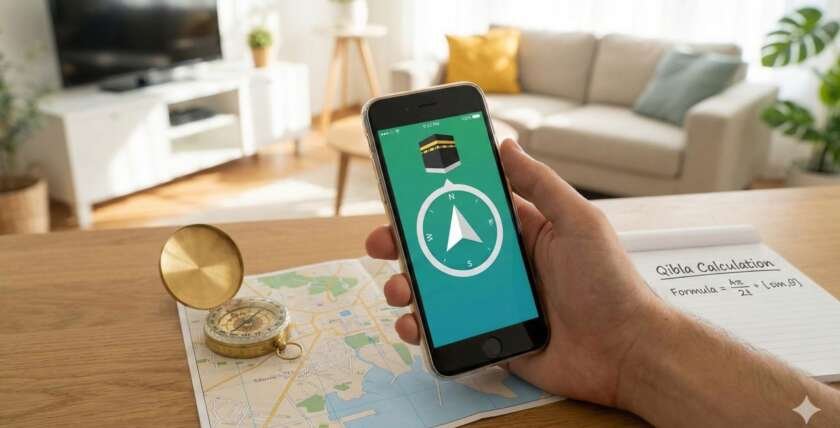
A new city also means a new bearing toward the Kaaba. The Qibla angle that worked in your bedroom or office at home cannot simply be carried to a hotel in another region. Use location-aware tools, a calibrated compass, a map, or a nearby mosque as a reference.
Prayer Time Tables has a separate guide on how to calculate Qibla direction easily using a compass, smartphone, online maps, and mosque orientation. Checking Qibla when you unpack is much easier than trying to solve it minutes before prayer.
6. Separate Adhan Time from Mosque Iqamah Time
An online timetable tells you when a prayer window begins according to its settings. A mosque may hold the congregational prayer later. Travelers often confuse those two schedules, especially when searching for Jumu’ah or evening prayers.
If you plan to attend a mosque, confirm the congregation’s own iqamah or Jumu’ah schedule. That information may come from the mosque website, social page, noticeboard, phone line, or local community. Build travel time into the plan; knowing Maghrib begins at a certain minute does not mean you can leave the hotel at that exact minute and still reach the congregation.
7. Plan the Day Around Prayer Before the Calendar Fills Up
Travel days fill quickly with boarding times, sightseeing, client meetings, family visits, meals, and transportation. A five-minute timetable check in the morning can prevent a difficult choice later.
Before a flight: check the departure city and the destination separately; the schedule after landing may be completely different.
Before a road trip: note where you expect to be around Dhuhr, Asr, and Maghrib, then recheck after major distance changes.
Before sightseeing: identify a quiet place or nearby mosque and note sunset so Maghrib does not arrive unexpectedly.
Before business meetings: look at the local timetable before accepting back-to-back appointments.
Before sleeping: check Fajr for the destination and set an alarm with enough preparation time.
What If Two Sources Disagree?
Small differences are common because sources can use different coordinates, Fajr/Isha angles, Asr methods, offsets, or high-latitude rules. Do not solve the problem by constantly switching to whichever time is most convenient. First compare the location, method, time zone, and Asr setting.
For congregational prayer, following the local mosque schedule avoids practical confusion. For personal planning, choose a reliable timetable and keep the settings consistent. If a difference raises a religious question rather than a technical one, ask a knowledgeable local scholar instead of treating an app setting as a fatwa.
A Simple Arrival Routine for Muslim Travelers
Confirm local time. Make sure your phone and watch are using the destination time zone.
Load today’s prayer times. Use the actual city or precise location rather than your home timetable.
Review calculation settings. Check Fajr/Isha method and the Asr juristic setting.
Find Qibla. Do it when you arrive, not when the prayer window is almost over.
Look for a nearby mosque. Confirm congregation times separately from the adhan timetable.
Set reminders. Use local prayer times to structure the rest of the day.
Let the New City Have Its Own Timetable
The easiest mistake in travel prayer planning is treating yesterday’s schedule as portable. It is not. Your commitment travels with you; the clock times belong to the place you are standing.
Use Prayer Time Tables to refresh your location, understand the calculation setting, and organize the day around the five prayers. When you arrive somewhere new, give the new city its own timetable—and let that timetable become part of the travel routine.
Frequently Asked Questions
Do prayer times change when I cross a time zone?
Yes. The displayed clock times change because your local civil time has changed, and the astronomical prayer times are calculated for the new location. After crossing a time zone, update your device and load a timetable for the destination rather than continuing to use times from the departure city.
Should I use my home mosque calculation method while traveling?
You can keep a consistent trusted calculation method for personal planning, but local mosques may follow different settings and will publish their own congregation times. If you intend to pray at a mosque, check its schedule. If the difference involves a religious judgment, seek guidance from a qualified local scholar.
How often should I refresh prayer times during a road trip?
Refresh the timetable after significant changes in location, especially when driving long distances east or west, crossing time zones, or staying overnight in a new city. For short local travel within the same metro area, one destination timetable is usually sufficient for practical planning.